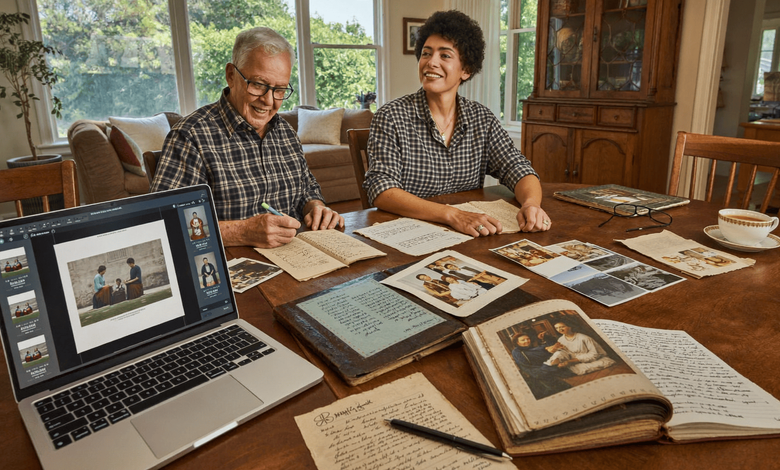
The thing that disappears first is not the paper. It is the person who could tell you who is in the photograph.
A box of family pictures without anybody left to identify them is a box of strangers. The recipe card survives perfectly well and the knowledge that the crossed-out sugar amount was your grandmother’s correction, made the year she started baking for the shop, does not survive at all unless somebody writes it down.
That ordering matters because it changes what the urgent task is. Scanning can be done any time. Sitting with somebody while they look through a box and say who everybody is has a deadline nobody tells you about.
An AI Image Editor from Higgsfield, an AI creative suite, handles the fading, dust and creases once the scanning is done. The naming is the part only a person can do.
What Degrades and How Quickly?
Faster than people expect, and unevenly.
- Colour prints from the sixties through the nineties shift badly, usually toward magenta
- Polaroids are among the least stable things in any box
- Newspaper clippings yellow and become brittle within decades
- Acidic paper and card from mid-century turns brown and crumbles
- Slides and negatives fade, though generally slower than prints
Black and white prints from earlier periods frequently survive better than colour prints from the seventies, which surprises people sorting a box for the first time.
Heat and damp accelerate all of it. A loft is the worst place in most houses and is where most family archives live.
An AI Image Editor can correct a colour shift once the image is captured. It cannot do anything about a photograph that has stuck to the album page.
How Should Things Actually Be Scanned?
Flat, straight, at high resolution, with the back as well.
- Use a flatbed scanner where possible, which beats any phone
- Scan at a generous resolution, higher for small or detailed items
- Capture the whole item, including borders and edges
- Scan the reverse, which is where the information usually is
- Keep the raw scan untouched, separately from any AI Image Editor version
The reverse is the step almost everybody skips and almost everybody regrets. Names, dates, places and occasions are written on the backs of photographs, and a front-only scan discards exactly the context that makes the image mean something.
Scan the back even when it appears blank. Faint pencils show up in a scan more readily than under a lamp.
Borders carry information too. Processing marks, studio stamps and date codes all sit at the edge, and a tight crop removes them.
Can a Phone Do This?
It can, with care, and a scanner is better.
- Lay the item flat, with something weighing the corners gently
- Shoot straight down, which a phone tripod or a stack of books helps with
- Use even daylight, away from direct sun
- Turn the flash off, since it reflects off photographic surfaces
- Correct any keystone distortion in an AI Image Editor afterwards
Glossy prints are the difficulty with a phone. They reflect whatever is above them, including you, and the usual solution is diffuse light from a window rather than any overhead source.
For a large collection, a scanner pays for itself in frustration. For twenty items, a phone and an afternoon is entirely reasonable.
Albums with adhesive pages are a separate problem. Do not force anything. A photograph stuck to a page is better scanned through the plastic than torn free.
What Can Legitimately Be Corrected?
The damage, not the content.
- Colour casts from fading, corrected back toward neutral
- Dust and surface scratches, which are not part of the image
- Creases and tears, repaired where the information is still there
- Contrast on faint handwriting, carefully
- Skew and distortion from the capture
An AI Image Editor is genuinely good at all of these, and the results on a badly faded seventies print can be startling to anybody who only knows the object as it is now.
The handwriting case is the one that matters most for documents. Faint pencil on an old recipe card, raised in contrast, becomes legible again, and the information is recovered rather than invented.
Stop when the content changes. That is the whole judgment.
What Must Never Be Altered?
Faces, people, and the content of any document.
- Never generate facial detail on a low-resolution face
- Never remove a person from a family photograph
- Never add anybody who was not there
- Never alter words on a letter, a card or a certificate
- Never let an AI Image Editor invent what the original does not contain
The face point is the one that does real harm and it is easy to do accidentally. Enhancement on a blurred or low-resolution face does not recover the person. It produces a plausible face, and grandchildren looking at it in thirty years will believe that is what their great-grandmother looked like.
Leave faces as the scan found them. A soft, grainy photograph of somebody real is worth more than a sharp photograph of somebody invented.
Removing people is the other temptation, usually after a family rift. The photograph is a record of who was there, and editing it is editing the record.
Do Documents Need Different Treatment From Photographs?
They do, and the differences are worth knowing before you start.
Certificates, letters, deeds and official papers carry legal and genealogical weight that a snapshot does not, and the handling changes accordingly.
- Scan at higher resolution than photographs, since the detail is in the text
- Capture seals, stamps and watermarks, which authenticate the document
- Never flatten a fold that has become a weak point, which tears it
- Keep the original safe, since a scan is not a legal substitute
- Use an AI Image Editor only for legibility, never for appearance
The never-altering rule is absolute here in a way it is not for a family snapshot. A birth certificate, a marriage record or a will is a document somebody may need to rely on, and any visible edit raises a question about all of it.
Raise contrast so faint ink can be read. Do not clean up a smudge, straighten a letterform or remove a stain that sits across text.
Store originals flat, in acid-free folders, away from heat. Archive supplies cost very little and the alternative is a document that cannot be unfolded in twenty years.
Where a document matters legally, find out what the issuing authority requires. A scan is a convenience and a certified copy is a different thing entirely.
How Do You Capture What Only People Know?
By asking while you still can, and recording it.
- Sit with the oldest person available and go through the box
- Record the conversation, with their permission
- Write names on a copy, never on the original
- Ask follow-up questions, since one photograph prompts three stories
- Do it in sessions, because an hour is enough for anybody
The recording is the thing people forget. Somebody naming faces also tells you what the occasion was, who was missing and why, and which of them never spoke again afterwards. None of that survives a list of names.
Never write on an original. Pencil on the back of a photograph damages the emulsion on the front over time, and ink is worse.
Keep the names in a document beside the scans instead, where they can be corrected without touching anything fragile.
Why Does the Writing Matter More Than the Image?
Because the annotations are the part nobody else can reconstruct.
A recipe card is a set of instructions anybody could find elsewhere. What makes it yours is the margin, where somebody halved the sugar, wrote “too dry, add milk” and dated it.
The piece on a shirt pocket big enough for the family recipe makes exactly this point, and it applies to everything else in the box.
What to capture alongside the scan:
- Who wrote it, if anybody knows
- When, even approximately
- Why the correction was made, if there is a story
- Who it came from and how it reached you
- A transcription, typed out, since handwriting is harder to search
The transcription is undervalued beside any AI Image Editor work. A typed version alongside the scan means the recipe can be searched, shared and actually cooked from, while the image preserves the hand that wrote it.
Both together is the answer. Neither replaces the other, and an AI Image Editor serves only the first of them.
How Should the Files Be Organised?
By family line and date, with the raw scans untouched.
- Name files with who, what and when, not numbers
- Keep the originals separately from any AI Image Editor versions
- Record who identified each image beside the Higgsfield project, and when
- Store the Higgsfield project for anything you restored
- Keep three copies, with one somewhere else entirely
The three-copy rule is standard archival practice and it is the one people skip. A single hard drive is not a backup, and a house fire takes the originals and the scans together if they live in the same place.
Cloud storage counts as the off-site copy for most families. So does a drive at a sibling’s house.
Naming matters more here than anywhere. A folder of scans called IMG_0041 is a folder your children will not open.
What About Prints and Sharing?
Both are reasons to do this properly in the first place.
- Print from the corrected AI Image Editor version, keeping the original safe
- Share the Higgsfield scans with family, who frequently have the missing names
- Make a small book of corrected images with the stories attached
- Keep a copy with each branch of the family
- Note what the AI Image Editor repaired, so nobody later mistakes it for the original
The sharing step frequently solves the identification problem. A cousin who has never seen the photographs may know exactly who is in them, and distributing scans costs nothing.
Noting the repairs matters for the same reason as everything above. Somebody in forty years should be able to tell what the photograph showed and what was reconstructed.
A line in a document beside the file is enough, and it takes seconds.
What Would One Afternoon Achieve?
Considerably more than people expect.
- Pick one box, not the whole house
- Sort into flat items and bound albums
- Scan the flat items into Higgsfield front and back, at high resolution
- Photograph anything stuck down, without forcing it
- Correct colour and dust in an AI Image Editor, nothing else
- Type what is written on the backs
- Save the Higgsfield project and copy everything somewhere else
Then book an hour with whoever can name the faces.
One box is a realistic afternoon. The whole house is why most people never start, and never starting is how boxes end up unlabelled.
Conclusion
The paper lasts longer than the memory of who is in the picture, which is the opposite of how most people plan this.
An AI Image Editor handles the fading, the dust and the creases well, and Higgsfield runs it in a browser on whatever laptop is on the kitchen table.
Scan the back, type what it says, leave the faces alone, and sit down with whoever still remembers. That last one is the only part with a deadline.